프로젝트

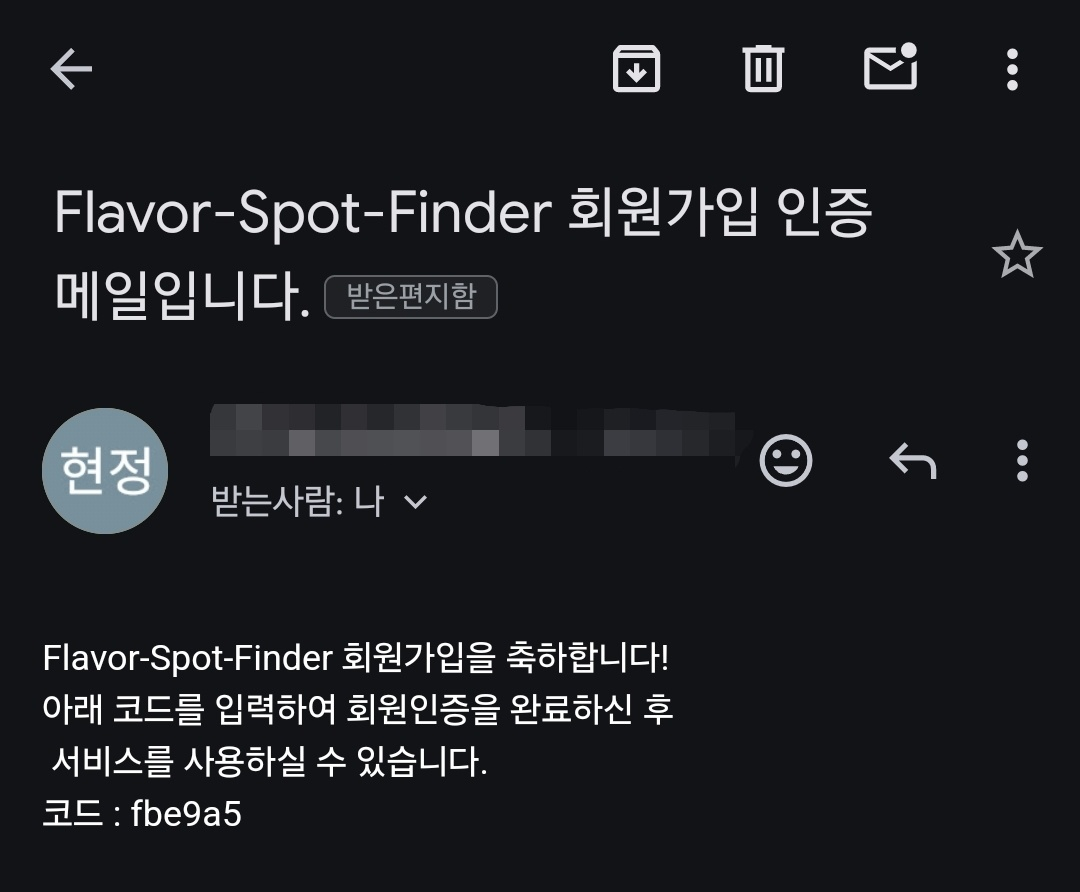
사용자 인증을 위한 이메일을 통한 인증 코드 전송을 진행합니다.


메일 인증 설정

1. email 전송 서비스 개발

  • 목적: 실제로 사용되는 메일인지 확인을 위한 인증 코드를 포함한 메일을 전송합니다.
  • 메소드: sendMail(String to, MailComponents subject, MailComponents content)
  • 코드
  /*
   * 이메일을 전송하는 메서드
   * 1) 메일 인증
   * 2) 비밀번호 초기화
   *
   * @param to      수신자 이메일 주소
   * @param subject 이메일 주제
   * @param content    이메일 내용
   */
  public void sendMail(String to, MailComponents subject, MailComponents content) {

      SimpleMailMessage mail = new SimpleMailMessage();

      // 인증 메일을 보내는 경우
      if (subject.equals(VERIFICATION_SUBJECT)) {
          createMail(mail, to, subject, content, 6);
      }

      send(mail);
  }
  /*
   * SimpleMailMessage 객체를 생성하는 메서드
   *
   * @param to      수신자 이메일 주소
   * @param subject 이메일 주제
   * @param text    이메일 내용
   * @param length  생성할 인증 코드 길이
   * @return 생성된 SimpleMailMessage 객체
   */
  private SimpleMailMessage createMail(SimpleMailMessage mail,
                                       String to,
                                       MailComponents subject,
                                       MailComponents text,
                                       int length) {
      mail.setTo(to);
      mail.setSubject(subject.getContent());
      // 메일 내용 구성
      mail.setText(String.format(text.getContent(), createUUID(length)));
      return mail;
  }
  /*
   * 이메일을 전송하는 메서드
   *
   * @param mail SimpleMailMessage 객체
   */
  private void send(SimpleMailMessage mail) {
      try {
          javaMailSender.send(mail);
      } catch (MailException e) {
          throw new CustomException(EMAIL_SENDING_FAILED);
      }
  }
  • yml 설정
  • mail: host: smtp.gmail.com port: 587 username: (@gmail.com 메일) password: (16자) properties: mail: smtp: auth: true starttls: enable: true

2. gmail에서 SMTP용 계정 설정

  • 방법
    • 성공적인 메일 전송을 위해서는 메일의 IMAP 설정을 활성화시켜야 합니다.
    • 앱 비밀번호 사용을 위해서 2단계 인증 활성화 > 앱 비밀번호호 16자를 yml에서 사용

3. 회원가입에 따른 성공적인 전송
java는 주로 import java.util.*; 이용


3. size() vs length

기본 자료형에서는 length 변수에 길이 가짐wrapper 클래스에서는 size() 함수에 들어가게 됨


java는 주로 import java.util.*; 이용


1. 리스트

python : list -> java 타입 + 인수 : ArrayList<String[]> a = new ArrayList<>();

[숫자, 문자] => 하나의 리스트에 한 타입만 가능하여 객체(인자, 생성자, get, set)로 구성


2. 정렬, 람다

python : lamdba -> java : comparator


java


1) 한줄로 : 2개씩 각 요소를 비교

p.sort((a, b) -> a[1] - b[1]);


2) 간단 Comparator

new LinkedList<>(); => 위 () 사이에 Comparator 사용해서 우선 순위 설정


리스트 lamdba 정렬

ArrayList<Integer[]> p = new ArrayList<>(); p.add(new Integer[]{3, 7, 1}); p.add(new Integer[]{1, 5, 2});

// Comparator 형태 : Comparator.<리스트 타입>comparing~(a -> a[0]) + .thenComparing(앞 내용)

// 1) Integer 요소 : 오름, 내림
p.sort(Comparator.<Integer[]>comparingInt(arr -> arr[0])
        .thenComparing(Comparator.<Integer[]>comparingInt(arr -> arr[1]).reversed())
        .thenComparingInt(arr -> arr[2]));

// 2) String 요소 길이 : comparingInt
p.sort(Comparator.<String[]>comparingInt(arr -> arr.length));

// 2) String 요소 사전 순 : comparing
p.sort(Comparator.<String[]>comparing(arr -> arr[0]));


객체 lamdba 정렬

// 핵심 : first는 오름차순, second는 내림차순, third는 오름차순

PriorityQueue<Triple> pq = new PriorityQueue<>(Comparator
	.comparing(Triple::getFirst).reversed() // 뒤에서부터 2번 사용 -> 오름
    .thenComparing(Triple::getSecond).reversed() // 뒤에서부터 1번 사용 -> 내림
	.thenComparing(Triple::getThird)); // 뒤에서부터 reversed를 붙일때마다 서로 순서가 반대
   
   
import java.util.*;

public class Main {
    static class Triple {
        int first;
        int second;
        int third;

        Triple(int first, int second, int third) {
            this.first = first;
            this.second = second;
            this.third = third;
        }

        int getFirst() {
            return first;
        }

        int getSecond() {
            return second;
        }

        int getThird() {
            return third;
        }
    }

    public static void main(String[] args) {
        PriorityQueue<Triple> pq = new PriorityQueue<>(Comparator
                .comparing(Triple::getFirst).reversed() // 뒤에서부터 2번 사용 -> 오름
                .thenComparing(Triple::getSecond).reversed() // 뒤에서부터 1번 사용 -> 내림
                .thenComparing(Triple::getThird));

        // 데이터 추가
        pq.offer(new Triple(3, 7, 1));
        pq.offer(new Triple(1, 5, 2));
        pq.offer(new Triple(2, 4, 3));
        pq.offer(new Triple(2, 5, 4));
        pq.offer(new Triple(1, 5, 3));

        // 우선순위 큐에서 데이터 꺼내기
        while (!pq.isEmpty()) {
            Triple triple = pq.poll();
            System.out.println("First: " + triple.getFirst() + ", Second: " + triple.getSecond() + ", Third: " + triple.getThird());
        }
    }
}


queue: LIFO로 다양하게 구현하는 방법이 존재 & 항상 import java.util.*;가 필요


1. LinkedList : 일반 > ArrayList : 시간 오래 걸림

  • Queue<Integer> queue = new LinkedList<>();
  • queue.offer(1); queue.poll(); queue.isEmpty();

=> 위 3가지 메소드는 Queue의 기본 메소드로, 어떤 new를 사용하던지 공통적으로 사용 가능


2. PriorityQueue : Queue vs PriorityQueue

  • Queue<Integer> queue = new PriorityQueue<>();
  • queue.offer(1); / queue.poll(); : 기본적으로 가장 작은 값이 우선


  • PriorityQueue<String[]> queue = new PriorityQueue<>();
  • 간단한 우선 순위 설정 
  • new PriorityQueue<>(Comparator.comparing(Triple::getFirst).reversed().thenComparing(Triple::getSecond).thenComparing(Triple::getThird));​
import java.util.*;

public class Main {
    public static void main(String[] args) {
        PriorityQueue<String[]> queue = new PriorityQueue<>(new Comparator<String[]>() {
            @Override
            public int compare(String[] a, String[] b) {
                // 여기서 우선순위를 설정합니다.
                // 예를 들어, 문자열의 길이를 기준으로 정렬하도록 하겠습니다.
                return a[0].length() - b[0].length();
            }
        });

        // 요소 추가
        queue.offer(new String[]{"apple"});
        queue.offer(new String[]{"banana"});
        queue.offer(new String[]{"orange"});

        // 우선순위가 가장 높은 요소 확인 (peek)
        String[] highestPriority = queue.peek();
        System.out.println("가장 우선순위가 높은 요소: " + Arrays.toString(highestPriority));
    }
}


3. ArrayDeque : 효율적인 메모리 사용과 높은 성능

  • Queue<Integer> queue = new ArrayDeque<>(); => 위 3가지 메소드
  • ArrayDeque<Integer> deque = new ArrayDeque<>();=> addFirst(Last)(x); deque.removeFirst(Last);
import java.util.ArrayDeque;

public class ArrayDequeExample {
    public static void main(String[] args) {
        ArrayDeque<Integer> deque = new ArrayDeque<>();

        // 앞과 뒤에서 요소 추가
        deque.addFirst(1); // 앞에 1 추가
        deque.addLast(2); // 뒤에 2 추가

        // 앞과 뒤에서 요소 제거
        int first = deque.removeFirst(); // 앞에서 요소 제거 및 반환 (1 반환)
        int last = deque.removeLast(); // 뒤에서 요소 제거 및 반환 (2 반환)

        System.out.println("First: " + first); // 출력: First: 1
        System.out.println("Last: " + last); // 출력: Last: 2
    }
}

캐시 메모리

: 속도가 빠른 장치 ~ 느린장치 간 속도 차에 따른 병목 현상을 줄이기 위한 메모리

캐시 메모리

  • CPU가 원하는 데이터 예측 → 적중률 극대화가 필요 → 시간/공간 지역성 이용
    • 시간 지역성 : 최근 참조 주소를 곹 다시 참조
    • 공간 지역성 : 참조된 주소와 인접한 주소가 다시 참조

Swapping

  • 메모리에서 사용되지 않는(CPU 할당 시간 끝) 일부 프로세스 → 보조기억장치
  • 실행할 프로세스 → 메모리 적재하는 메모리 관리 기법

⇒ 요구하는 메모리 공간의 크기가 실제보다 크더라도 프로세스들 동시 실행 가능

메모리, 스왑 영역 간 옮겨지는 행위 : swap-out / swap-in (메모리 기준 out, in)

Swapping 사용 시, 문제 : 단편화

  • 프로세스들이 메모리 적재와 제거의 반복에 따라 사용하지 못할만큼의 작은 자유 공간 → 메모리를 효율적으로 사용하지 못하는 상태
  • 내부 단편화 : 프로세스의 메모리 공간 중 남는 공간
  • 외부 단편화 : 메모리에서 프로세스들 사이 남는 공간

외부 단편화 해결

메모리 압축 : 프로세스가 사용하는 메모리 공간을 한쪽으로 몰아 분산된 자유 공간 확보

페이징 기법 : 물리 메모리는 frame으로 분리 & 논리 메모리는 페이지 블록으로 분리

  • 논리 메모리가 프로세스의 공간을 여러 페이지로 분리한 것을 관리
  • 페이지 블록이 순서 상관 없이 물리 메모리 프레임에 매핑
  • 문제 : 페이지 크기에 따른 내부 단편화 발생

내부 단편화 해결 : 세그멘테이션

  • 프로세스를 논리적인 내용 단위로 분할하여 저장
  • 문제 : 외부단편화 발생 ← 세그먼트 별로 단위가 달라서

'Information' 카테고리의 다른 글

리눅스 명령어  (0) 2023.08.19
[NEWS] 23년 8월 2주차  (0) 2023.08.11
[Information] 2. Process와 Thread 실행  (0) 2023.08.08
[Information] 1. Process와 Thread  (0) 2023.08.08
SW 아키텍쳐 직무 - SW 아키텍쳐 비전 수립  (0) 2023.04.26

+ Recent posts